
Making a printed circuit board is always an interesting project. You might also enjoy making custom electronic devices. You might want to make a simple power amplifier. Or, you might be interested in building a small inverter. Thousands of projects are out there to try. However, you might still be stuck on choosing the right PCB design software.
Finding the right PCB design software is not always easy. You may have tried several tools. Some offer great flexibility but have limited component libraries. Others may have enough components but cannot really meet your technical requirements. You might also find software that has everything you need but is too expensive.
Therefore, choosing the right PCB design software is crucial. Consider several factors before deciding. For example, how complex is your PCB design? How many layers do you need? Does the software support simulation and design rule checking? You should also consider component availability and so on.
Introducing PCB Design Software
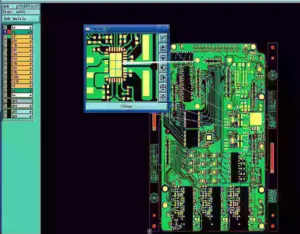
PCB design software is a computer program, typically used to design PCB. It mainly helps you turn your circuit ideas into actual PCB layouts. Instead of drawing a circuit by hand, you can design the entire board on a computer. You can use PCB design software to create diagrams, place components, and connect them. The main goal is to create an accurate PCB design that is ready for manufacturing. A good PCB design software should have several key features.
1) A PCB design tool creates circuit diagrams using electronic symbols. These symbols and connections are all standardized. However, some tools use their own standard symbols.
2) The design software also arranges components and routes copper traces on the board.
3) It must have access to electronic components with symbols, footprints, and technical details.
4) The design tools must identify layout errors, such as incorrect spacing and trace widths. So you can correct them even if you make mistakes.
5) It should be able to design multi-layer PCBs. However, different software allows different layer counts.
6) It should generate Gerber files, drill files, and other production documents.
Some PCB design software goes beyond these basic features and also lets you simulate. But free versions may not include this feature. For complex electronic projects, 3D visualization and fast signal analysis are suitable.
Factors to Consider When Choosing a PCB Design Software
You already have some ideas about what PCB design software usually features. However, this section discusses these features in more detail. You will learn which technical factors you should consider when choosing it. This guide will be especially helpful for beginners.
Design Complexity and Technical Requirements
Design complexity refers to how difficult a PCB is to design. It may depend on the number of components, board size, number of layers, and traces. For example, a simple LED circuit may only need a few components and traces. However, a high-density PCB may contain hundreds of components in a small area. It may also need very thin traces, small spacing, and multiple layers.
The design complexity also depends on the technical requirements. Some PCBs carry high-speed signals. Others handle high frequencies or high current. These designs need special attention to signal quality and trace width. Because these devices are usually high-density, you must handle component placement carefully.
Therefore, choose PCB design software based on several design factors. Here are four important factors to consider.
Layer Limits
PCB layers are the copper layers that connect components. A simple PCB may have only one or two layers. Complex boards may have four, six, or more layers. Most free PCB design tools limit how many layers you can use. Most premium PCB design software gives you more flexibility. Therefore, when choosing design software, check its layer limits. Make sure it supports your current and future projects.
High-Speed and RF designs
High-Speed and RF circuits need more careful PCB design. They require stable signal integrity from input to output. If you are designing power amplifiers, you will need a VCO to generate the circuit’s signals. From the VCO output to the amplifier output, the whole journey isn’t simple. You will also add circulators and other necessary transistors. To avoid signal loss or interference, you need a high-quality design.
Design Rule Checking
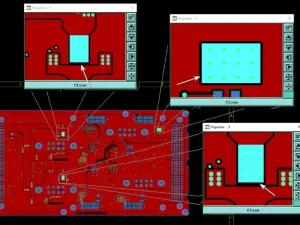
Design rule checking is one of the most important features of PCB design software. It automatically checks your PCB layout against a set of design rules. For example, it can detect traces that are too close to nearby traces. It can also identify insufficient clearances, incorrect trace widths, and other layout problems.
Some PCB design software lets you create custom rules. It then automatically flags errors while you design. For example, high-frequency boards often require more than basic rules.
Simulation and Analysis
DRC can check design issues, but it can’t check functional problems. To verify functional accuracy, you need a simulation program.
Simulation helps you test circuit behavior. It can help you identify functional problems early. This way, you can ensure your design is accurate and ready for production. PCB design software with simulation capabilities gives you confidence in every design task.
Not all PCB design software includes simulation tools. Some offer built-in simulation, while others may require external software. Check which simulation features are available and whether they meet your project needs.
Library and Component Management
Many different types of PCBs are used in electronics. Each type uses different components. PCB components also have different qualities, called Q-factors. Q-factor especially matters when you deal with signals. Suppose you are making a VCO. Adjusting the frequency, bandwidth, and power is tricky. In this case, a high Q-factor keeps the signal stable and within range. This is why library and component management is an important part of PCB design software.
A good PCB design tool should provide a wide range of selection. It should allow you to create, edit, and organize custom components. In this case, you should consider two main factors: the component database and the supply chain.
Component Database
A component database is mainly an online collection. It updates automatically whenever new components become available. In this case, consider two types: manufacturer-based and design-based databases.
A manufacturer-based database typically shows parts available only from that factory. This means you can only use the parts available when you create the design. A design-based component library, on the other hand, has all the possible components. This kind of database has one downside. So let’s say you want a high-factor component but can’t get it. You will have to remake the PCB or buy it in ways that are both expensive and difficult to manage.
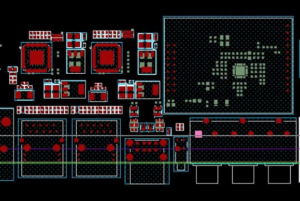
On the other hand, some software may only allow you to design the PCB layout. They usually don’t feature a component database. Some might have limited libraries or outdated components. So, choose PCB design software that offers what you need. It should also support you with custom component creation and imports.
Supply Chain Integrator
This feature typically connects your software to the component supplier. This way, you don’t need to depend on the manufacturer’s database. Instead, you can design PCB software using the supplier’s database. All you need to do is create the PCB layout and send the board to the supplier for assembly. Although it might add some cost, it can solve the component shortage problem.
Licensing Cost
Once you consider the above factors, you can estimate the overall cost. The main cost is buying the premium packages. Free versions won’t let you access all the features.
Free software may suit beginners who want to learn how the basic tool works. However, for complex projects, the free version is not enough. You will need the premium package to access more advanced tools. Therefore, before choosing software, compare its features and pricing. Make sure the software fits your project, requirements, and budget.
3 Popular PCB Design Software
Many PCB design software options are available online. Even PCB manufacturers have created their own dedicated software for their customers. Not all of them suit your needs. Some suit beginners, while others are designed for professionals. Let’s introduce the 3 most popular choices in 2026.
Whether you are a beginner or a professional, EasyEDA can definitely be the first choice. It offers both a browser-based and a dedicated software Ui. It supports all the necessary features you need to complete your PCB project. The best part is that it includes a component database integrated with JLCPCB. You can design your circuit board and order the PCB directly from the software.
The next two most popular software programs are Altium and KiCad. Both tools are ideal for professionals. Altium might be a bit challenging for beginners. But over time, you will get used to it. Both offer advanced simulation and functional testing. However, KiCad would be better for students and hobbyists.
Summary
PCB design software includes design, simulation, and rule-checking tools. It is the first place where you build your PCB virtually. To stay on the right track, it must provide everything you need. However, when you are trying to choose the right software, you might be unsure which one to choose. Many options are available, but not all offer the same features.
When choosing the right PCB design software, you should consider a few factors. First, check how complex a PCB you can design. Second, check its component database. Third, check whether the software offers a simulation program for functional testing. Finally, check the software’s licensing cost.
Ultimately, the PCB design software you choose still depends on your personal preferences. Your project needs, experience, and budget affect the right decision. Choose a tool that makes your design process easier and more efficient.